
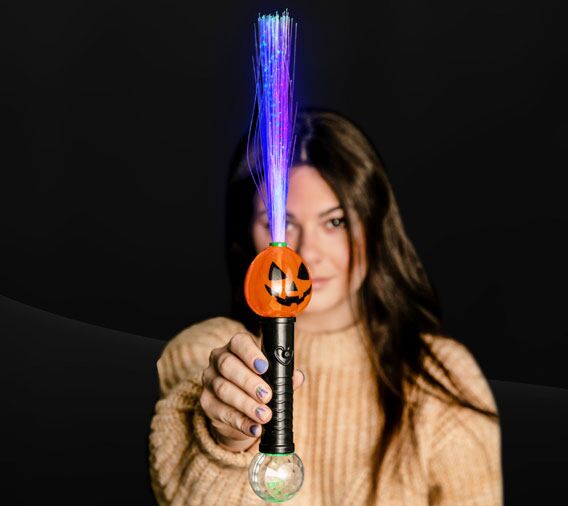



Flashing Pumpkin Fiber Optic Wand
SKU
FN816
$3.68
In stock
| PIECES | PRICE | YOU SAVE |
|---|---|---|
| 24 | $2.97 | 19 % |
| 96 | $2.68 | 27 % |
| 192 | $2.45 | 33 % |
| 288 | $2.26 | 39 % |
Bring a colourful Halloween glow to every celebration with this Flashing Pumpkin Fiber Optic Wand. This 16-inch LED wand combines a festive pumpkin design with bright fiber optic strands, making it a fun accessory for trick-or-treat events, Halloween parties, costume nights and fall celebrations.
Remove the plastic pull tab and press the power button to start the flashing display. Press again to rotate through the multiple light modes, creating a changing fibre optic effect that stands out in dark party spaces and nighttime events.
AG13 batteries are included, pre-installed and replaceable, so the wand is ready to activate straight from the package. Browse more Halloween light up toys and accessories and LED light up wands, or visit the Premier Glow homepage for party favors and glowing novelty products.
Flashing Pumpkin Fiber Optic Wand Features
- 16-inch light up Halloween wand
- Festive pumpkin-themed design
- Colourful fiber optic light display
- Multiple selectable flashing modes
- Easy push-button activation
- AG13 batteries included and pre-installed
- Replaceable batteries
- Bulk packaged for parties, prizes and event giveaways
Frequently Asked Questions
How long is the pumpkin fiber optic wand?
The wand measures approximately 16 inches long.
Does the pumpkin wand have different light settings?
Yes. Press the power button repeatedly to rotate through the multiple flashing modes.
How do I turn on the fiber optic wand?
Remove the plastic pull tab, then press the power button to activate the light display.
Are batteries included?
Yes. AG13 batteries are included and pre-installed.
Can the batteries be replaced?
Yes. The AG13 batteries are replaceable.
| Length | 16 Inches |
|---|---|
| Country of Origin | China |
| Packaging | Bulk Packaged |
| Batteries Included | Yes, AG13 |
| Batteries Replaceable | Yes |
| Multi-Modes | Yes |
| Instructions | Remove plastic tab and press power button to rotate flashing modes. |
Related Products
Check items to add to the cart or